AnyList: Grocery Shopping List
- 4.8
- Rating
- 1.00M
- Installs
- Free
- Price

 Analysis by App-foxy
I started using AnyList because grocery shopping is one of those small chores that becomes surprisingly messy when several people are involved. A note on the fridge, a forgotten message, and a recipe open in another app can easily turn one supermarket trip into three separate memory tests. AnyList brings that process into a focused productivity app for Android and iOS, built by AnyList, with shopping lists, recipe organization, and meal planning at its center.
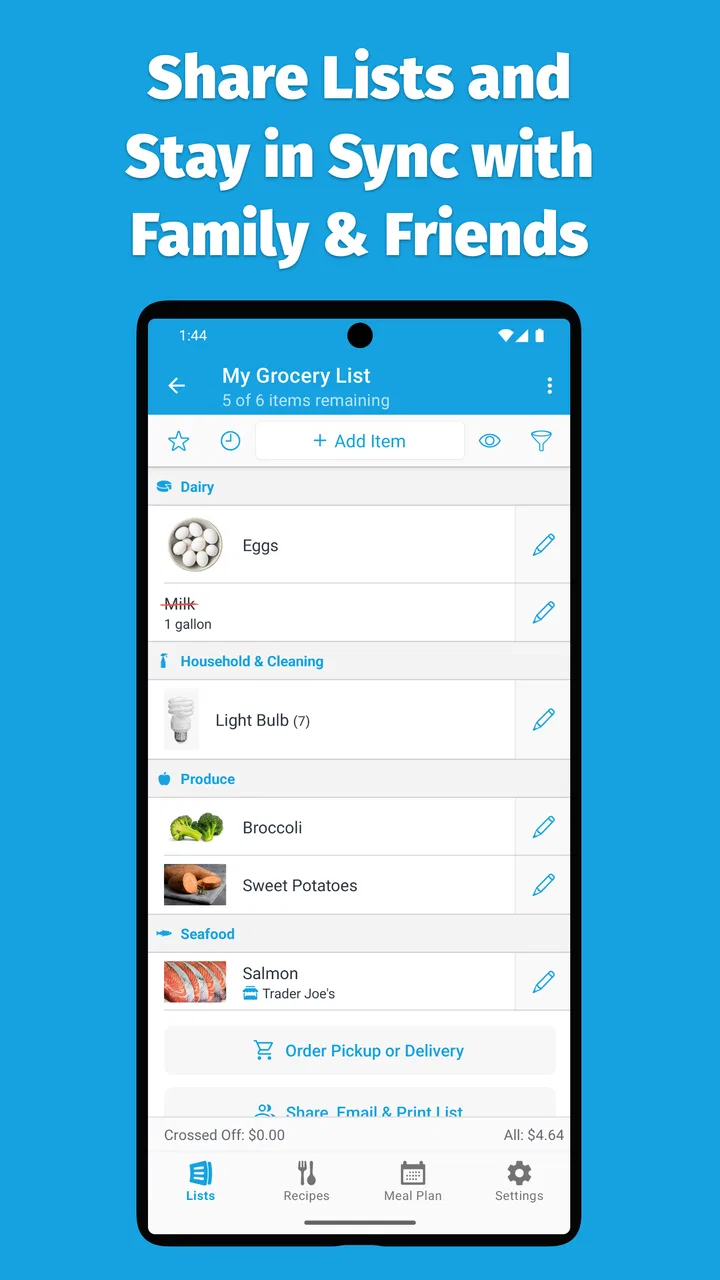
My first impression was that it makes sense because it stays close to the actual task. I am not asked to manage a complicated project or build a full household database before I can add milk. I can create a list, add items, arrange them in a useful order, and share the list with someone else. That simplicity is the main reason I would recommend trying it, although the app becomes more interesting when it is used as a repeatable food-planning system rather than as a basic checklist.
How AnyList feels during everyday use
I find the everyday experience most useful when a shopping list is changing, not just when I’m checking off a fixed set of items. Treating the shared list as the household’s one place for grocery requests can cut down on scattered messages, while keeping each entry concise makes it easier to scan in a busy store. That practical rhythm also helps show where AnyList’s broader planning tools add value—and where a simpler option may be enough.
You May Also Like

 Blood Strike: 2.5 Anniversary
Blood Strike’s Loadouts Turn Every Drop Into a Tactical Gamble
A close look at Blood Strike’s custom loadouts: how fast access to signature weapons reshapes its battle royale rhythm, rewards preparation, and narrows the gap between fights.

 Pandora - Music & Podcasts
Pandora’s Music Is Easy to Start, but Harder to Recover
Pandora’s strength is its low-effort path from a seed to a station. Its weak spot is how much confidence it asks you to place in connection, setup, and quiet recovery.

 8 Ball Pool
 Is Built on Rivalries, Rematches, and Routine
A close look at the rivalries, rematches, shared routines, and unanswered safety questions that turn a quick pool match into a persistent mobile community.

 Samsung Music
’s Quiet Strength Is Playing What You Already Own
Its reach comes less from spectacle than from dependable access to a personal library. That simplicity is both the app’s strongest retention engine and its ceiling.

 AccuWeather: Weather Radar
AccuWeather Review: A Quick, Clear Forecast for Everyday Decisions
For everyday plans, the best forecast is the one you can understand quickly. AccuWeather makes rain timing, radar, and local conditions easy to act on, with a few trade-offs.

 Hill Climb Racing
Why Hill Climb Racing Still Turns Crashes Into One More Run
A tiny car, a bumpy hill and one more upgrade: Hill Climb Racing keeps resurfacing because its simple chaos makes every near-miss feel personal.
More From Our News Desk



Speed expectations when the list is short or changing quickly
For a shopping-list app, speed is less about dramatic animations and more about whether the next item can be entered before I forget it. AnyList is designed around quick additions and clear list handling, so it feels suited to the moments when I am standing in the kitchen with one hand busy or adding items while someone calls out requests. The interface does not need to turn a simple entry into a form-filling exercise, which keeps the mental cost low.
That matters most when I am preparing to leave home. I can think in fragments: coffee, tomatoes, detergent, something for breakfast. A useful list should accept those fragments without forcing me to decide the perfect category immediately. I found that this approach makes the app more practical than a general notes app, where every item tends to become part of one long block of text.
The difference from a paper list is not merely that the phone can be carried in a pocket. A digital list can be edited without rewriting everything, and a shared list can reflect changes made by another person. Compared with a standard notes app, AnyList gives the shopping task its own structure. Compared with a full meal-planning service, it is easier to approach when I only need a list today and want to plan more carefully later.
There is a trade-off here. The more structure I add to my lists, the more useful they become, but also the more time I spend maintaining them. Someone who buys the same small group of items every week may prefer a minimal checklist and never explore the deeper organization. That is not a failure of the app; it is a reminder that convenience depends on matching the setup to the way I shop.
What happens during heavy-use moments
The busiest situation is not a large supermarket trip by itself. It is a trip where the list is changing while I am shopping. A partner may add an item, I may remember an ingredient after reaching the store, and a product may need to be replaced because it is unavailable. Shared lists are valuable in that situation because the list becomes a common working space instead of a message that one person must interpret.
I would use a separate list for a large weekend shop rather than mixing it with errands, household repairs, or long-term reminders. That separation sounds obvious, but it makes a practical difference: the list stays readable when I need to scan it quickly. I also prefer creating recurring list patterns for different situations, such as a normal weekly shop, a baking trip, or preparation for guests. This avoids rebuilding the same mental outline every time.
Recipes are where the app can move beyond the usual checklist. Instead of treating a recipe as something I read once and forget, I can use it as a bridge between meal planning and shopping. The useful workflow is to decide what I intend to cook, identify the ingredients that are actually missing, and then turn that need into a shopping action. That reduces the common problem of buying ingredients without a plan or planning meals around food that is already past its best.
One non-obvious benefit is that recipes can help me spot duplication before I shop. If two planned meals use similar ingredients, I can think in terms of one combined purchase rather than two separate recipe lists. This is especially useful when I am cooking for more than one person, because the shopping decision is not just “what does this recipe contain?” but “what will I realistically use across the week?”
Heavy use also reveals the app’s likely limit for some households: a shared list is only as effective as the habits of the people using it. If one person adds vague entries and another expects exact brands or quantities, the app cannot resolve that disagreement by itself. I found it helpful to make item names specific enough to be understood without a follow-up message, while avoiding so much detail that the list became slow to scan.
Reliability and recovering from ordinary mistakes
A shopping list earns trust through small recoveries. I will inevitably mark something by accident, remove an item too soon, or change my mind after entering it. AnyList is most useful when it lets me correct those everyday mistakes without making me reconstruct the whole list. The basic checklist model supports that kind of recovery better than a handwritten note, where an erased or crossed-out item can become ambiguous.
Shared editing also changes how I think about reliability. I do not have to be the only person responsible for keeping the list current. If another household member notices that an item is needed, they can contribute rather than waiting for me to remember. In practice, this reduces the number of “I thought you were buying it” moments, provided everyone agrees which list is the active one.
I would still avoid treating any shopping app as a substitute for judgment. A checked item does not prove that the right size, variety, or quantity was purchased. For items where substitutions matter, I would add a short note rather than relying on memory. The app can preserve the instruction, but the person in the store still needs to read it.
The recipe side has a similar recovery advantage. If my meal plan changes, I can adjust the plan instead of leaving a paper schedule that no longer matches what I intend to cook. That flexibility is more valuable than a rigid calendar for me, because real weeks change. A late evening, an unexpected invitation, or a missing ingredient can make one meal unrealistic, and a useful planning tool should not punish me for adapting.
AnyList has a strong reputation in the stores, with a 4.8 average from around 30 thousand ratings and more than a million installs. Those figures suggest that many people find the core experience dependable enough to keep using, but my own recommendation is still based on fit: the app is most convincing when shared lists and food planning are regular parts of your routine.
Device constraints and the cost of keeping the system useful
AnyList is free to install and is rated for Everyone, which makes it approachable for a household with different ages and different levels of technical confidence. The important constraint is not age but screen use. A phone is convenient in a store, yet it can be awkward when I am carrying bags, pushing a trolley, or trying to compare products. I still need a list that can be scanned quickly, with wording that does not require repeated tapping.
For that reason, I would not put every detail into an item name. A short entry is easier to find and check, while a note can carry the exception. I also recommend cleaning old items instead of allowing a list to become a historical record of every purchase. This is a small maintenance habit, but it protects the app’s main advantage: reducing decisions at the moment I need to make them.
Resource demands are difficult to judge from a store page alone, and I would not choose AnyList on the assumption that it is a heavy or lightweight app without testing it on my own phone. In normal use, a shopping list should not require the same attention as a media-rich application, but the practical question is whether it remains comfortable on the device I already own. If your phone has a very small display, older hardware, or aggressive battery-saving settings, the best approach is to try the free version with a realistic list before paying for anything.
The free entry point is another useful constraint to understand. AnyList is free, while optional in-app purchases are listed from about ten to fifteen dollars per item. I would begin without paying and see whether the basic list workflow solves my problem. The paid choice makes more sense only after I know that recipe organization, meal planning, or other expanded needs are genuinely part of my routine. Buying first and discovering later that I only wanted a simple checklist would be unnecessary.
The app was released on April 29, 2019, and its established presence is reassuring for someone who does not want to build a household routine around an unknown tool. Still, release history alone does not guarantee that every device will feel identical. Android and iOS users may notice differences in navigation or system behavior, so I would test the exact platform used by the people who need to share the lists.
Where it beats usual alternatives, and where it does not
A paper list remains better for people who dislike using a phone while shopping. It is immediate, private, and impossible to distract with notifications. If I am buying only two or three things, paper may actually be faster. AnyList earns its place when the list changes, needs to be shared, or connects to a meal plan.
A notes app is flexible, but that flexibility often creates clutter. A note can hold a shopping list, a recipe link, a reminder, and unrelated thoughts together, which is convenient until I need one item in a crowded store. AnyList is more focused, so I would choose it when the main requirement is repeatable food organization rather than free-form writing.
A task manager may be the better option for someone who wants grocery shopping alongside work projects, deadlines, recurring chores, and detailed task dependencies. AnyList is not trying to be a universal task system. Its strength is the narrower workflow from planned food to needed ingredients to completed shopping. That focus is an advantage for households that want less configuration, but a limitation for users who want every responsibility in one place.
A recipe platform can be preferable if discovering new cooking ideas is the main goal. AnyList is more practical when I already know what I like to cook and want to turn those decisions into an organized plan. I would skip it if I expect a large culinary database, elaborate nutritional analysis, or a complete household inventory system. The app is strongest as a bridge between decisions I have already made and the shopping needed to carry them out.
A realistic weekly workflow
My preferred routine would begin at the start of the week with a quick look at the meals I am likely to prepare. I would choose a few realistic recipes, not an ambitious schedule that assumes every evening will go perfectly. Then I would review the ingredients together, remove anything already at home, and keep the remaining needs in the shopping list. This is where AnyList can save more effort than simply writing “groceries,” because it connects the list to an actual plan.
Before leaving, I would split unrelated errands into their own lists. In the store, I would mark items as I place them in the trolley and add substitutions as notes when necessary. If someone at home remembers another item, the shared list gives them a place to add it without interrupting the trip. Afterward, I would clear or refresh the active list so next week does not inherit a confusing mixture of completed and new items.
The key insight is that the app works best when I use it before the supermarket, not only inside it. Planning reduces the number of decisions made while tired or hungry. It also exposes unrealistic meal plans early. If the ingredient list is too long for the week I actually have, I can simplify before buying food that will not be used.
Who should use it and who should pass
I think AnyList is a strong match for couples, families, roommates, and anyone who repeatedly shops from recipes. It is also useful for a person who wants a dedicated food-planning space without adopting a broad productivity system. The free price makes experimentation easy, and the Everyone rating removes an obvious barrier for mixed-age households.
I would be more cautious if you rarely cook, shop spontaneously, or prefer one universal notes file for everything. The app may feel like extra administration when your shopping habits are already simple. I would also skip it if your main need is detailed budget tracking, inventory control, or a comprehensive task manager. Those jobs call for tools designed around those priorities rather than a focused grocery workflow.
Another consideration is shared discipline. If only one person updates the list and everyone else continues sending scattered messages, the app will not deliver its full value. The best results come when the household treats the shared list as the single source of truth. That is a behavior change, not a feature, and it may take a little time to establish.
My performance verdict
After looking at the way AnyList handles quick entries, shared shopping, recipes, and meal planning, I see it as a focused and sensible productivity app rather than an all-purpose organizer. Its perceived speed comes from keeping the main action simple. Its usefulness during busy shopping trips comes from shared editing and clear separation between lists. Its reliability is strongest when I maintain one active workflow instead of letting old items accumulate.
The main friction is that a focused tool still needs thoughtful setup. Lists can become untidy, shared entries can be vague, and recipe planning can turn into work if I make it more elaborate than my week requires. The optional purchases, priced from about ten to fifteen dollars per item, are worth considering only after the free experience proves that the extra organization will be used.
With around 8.2 thousand reviews and a long enough presence to have reached over a million installs, AnyList feels like a mature choice for people who want shopping and meal decisions connected. I would recommend starting with one shared weekly list, adding a few recipes, and judging the app by whether it reduces forgotten items and last-minute decisions. Its real strength is not making a grocery list; it is turning a repeated household routine into something easier to coordinate.
FAQs for AnyList: Grocery Shopping List
01What is AnyList: Grocery Shopping List, and what can I use it for?
AnyList is a grocery and household shopping list app designed to make planning and shopping more organized. You can create multiple lists, add items quickly, group products by category, include notes and quantities, and mark items as purchased while shopping. It is also useful for shared household lists, meal planning, and keeping everyday errands in one place instead of relying on paper notes or scattered messages.
02Can I share an AnyList with family members or other people?
Yes. AnyList supports shared lists, allowing family members, roommates, or partners to view and update the same shopping list. Changes can be synchronized so everyone can see newly added products or completed items. This is especially convenient when several people contribute to grocery planning. However, users should check the current app permissions and account requirements, since sharing and synchronization may depend on the platform and the specific AnyList plan being used.
03Is AnyList free to download, and are there paid features?
AnyList can generally be downloaded and used without an upfront purchase, but some advanced tools may require AnyList Pro or another premium option, depending on the current version and platform. Basic list creation and shopping functions are typically enough for simple grocery trips, while premium features may include enhanced customization, additional organization tools, or expanded sharing and planning capabilities. Review the in-app pricing before subscribing.
04Does AnyList work offline while I am shopping?
AnyList is useful in stores where internet access may be weak or unavailable because you can normally view and update your lists locally. This means you can check products off and continue organizing your shopping without depending entirely on a live connection. When connectivity returns, shared-list changes can synchronize. For important shared lists, it is still sensible to open the app before leaving home and allow recent updates to load.
05Is AnyList available for both Android and iPhone, and does it support synchronization?
AnyList is primarily known as a shopping-list app for Apple devices, including iPhone and iPad, with synchronization available through its supported ecosystem and account features. Availability and cross-platform support can change over time, so Android users should verify the official Google Play listing before downloading or looking for alternatives. If several household members use different operating systems, confirm that the current version supports the sharing setup you need.
Pros
- Syncs grocery lists quickly across multiple devices and family members.
- Supports voice input
- making it easy to add items while cooking or shopping.
- Smart suggestions speed up adding frequently purchased products.
- Items can be organized by store sections for faster shopping trips.
- Shared lists update in real time
- reducing duplicate purchases.
Cons
- Many useful features require an AnyList Premium subscription.
- The interface can feel overly detailed for users wanting a simple checklist.
- Advanced meal-planning tools may take time to learn.
- Limited customization of list layouts and category colors.
- Some users may find account setup unnecessary for basic list use.

AnyList: Grocery Shopping List
Gallery